GenomeMiner

BIOINFORMATICS WORKSPACES FOR GENOMIC R&D

Move genomic data into research decisions.

GenomeMiner gives microbial and genomic discovery teams one place to organize research data, run managed bioinformatics pipelines, follow analysis progress, and review results with collaborators.

Request a free pilot Explore our pipelines
Free pilot access and project-based pipeline credits available.
Selected partners

Keep the research connected

Your science should not disappear into files, scripts, and handoffs.

When data sits in one place, analysis runs in another, and results travel by email and shared folders, the context behind every decision erodes. Teams rerun work they can't trace and wait on the one person who knows how the scripts work.

Fragmented research

  • External drive
  • Dropbox
  • Analysis scripts
  • Lab workstation
  • Terminal logs
  • Output folders
  • Results spreadsheet
  • Email threads

GenomeMiner Workspace

Collaborators
Datastore
Pipeline run
ResultOutput filesLogsAnalysis

Workspace activity · team notified when results are ready

  1. 01

    Know how every result was made

    Inputs, parameters, logs, and outputs are recorded with every run, so results can be reviewed and reproduced without detective work.

  2. 02

    Run analyses without a bottleneck

    Scientists launch supported pipelines from a guided form while computational specialists stay in control of the methods.

  3. 03

    One view for the whole team

    Scientists, specialists, collaborators, and clients work from the same program, each with the right level of access.

One connected research loop

From research data to reviewable outputs.

GenomeMiner connects the practical stages around genomic analysis, keeping the data, execution history, and results available within the same research workspace.

  1. 01

    Organize the data

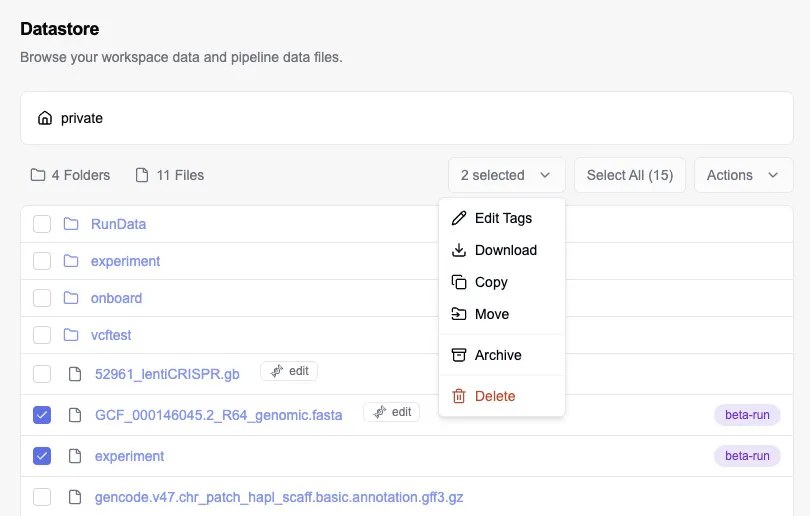
    Upload files, create folders, apply tags, build archives, and maintain structured research records for the project.

    GenomeMiner Datastore showing folders, research files, selected items, and the Actions menu
    Datastore · sequence files and tagged folders
  2. 02

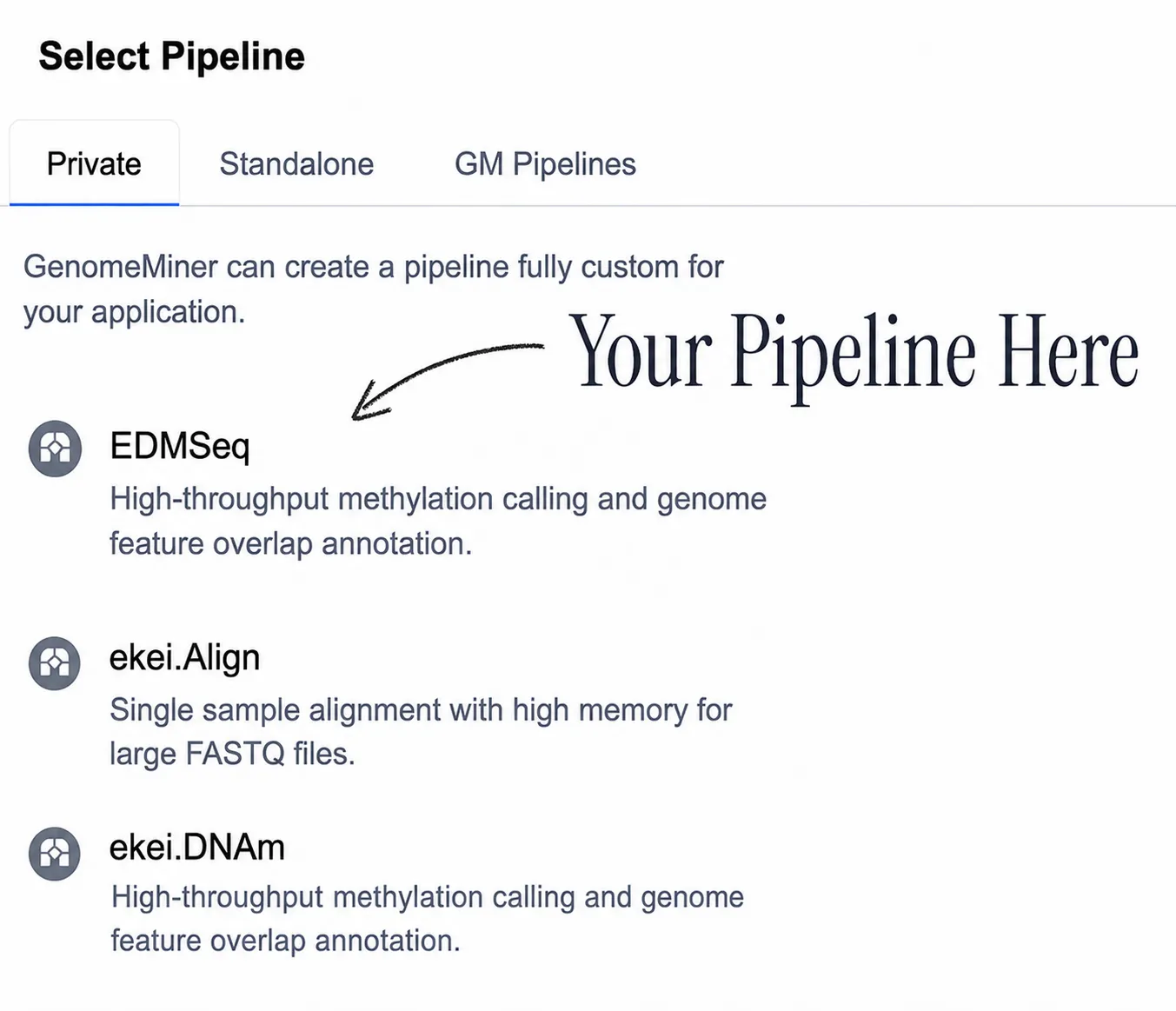
    Configure the analysis

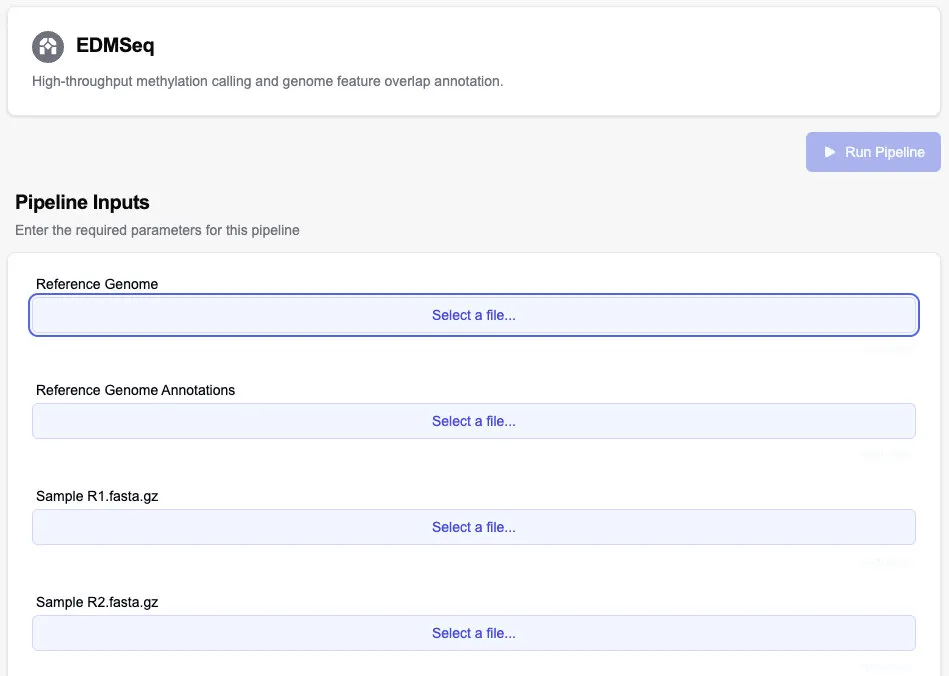
    Select a supported pipeline and provide its files, references, parameters, and other required inputs through a structured form.

    EDMSeq pipeline configuration showing required reference genome, annotation, and sample file inputs
    Pipeline input form · practical research inputs
  3. 03

    Follow the run

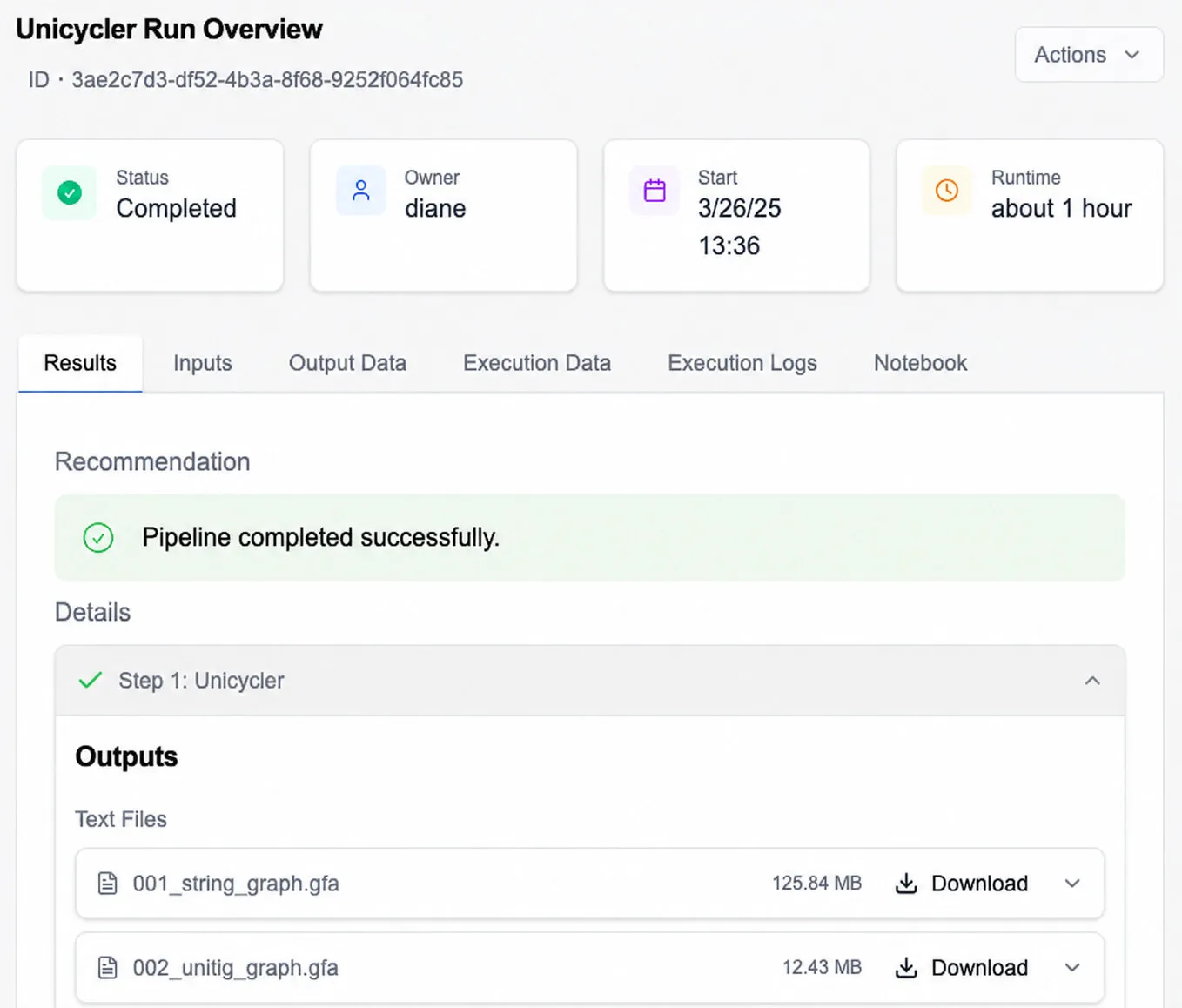
    See active and historical analyses, monitor status, inspect execution details, and review logs as the work progresses.

    Completed Unicycler pipeline run overview showing status, runtime, results, and downloadable output files
    Run page · status, pipeline details, and logs
  4. 04

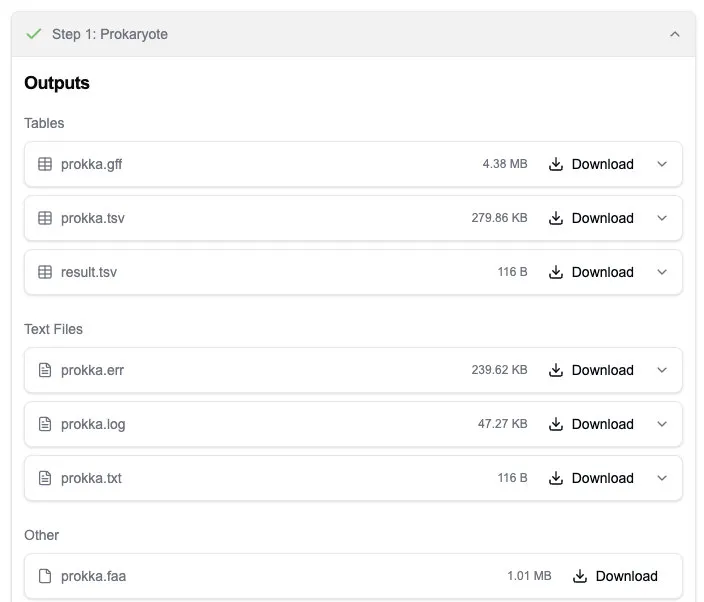
    Review and retain the outputs

    Inspect pipeline outputs, download results, or copy execution and output data into the workspace datastore for continued research.

    Completed Prokaryote pipeline step showing downloadable table, text, and sequence output files
    Completed run · outputs and workspace retention

Pipeline coverage

Production-ready pipelines, from raw reads to biological insight.

Launch established tools for every stage of genomic research without installing software or provisioning compute. Each run keeps its inputs, parameters, logs, and outputs together.

  1. 01

    Prepare sequencing data

    Read processing, basecalling, alignment, subsampling, quality control, and sequencing visualizations.

    • Illumina Read Processing
    • Nanopore Read Processing
    • Dorado Basecaller
    • Dorado Aligner
    • Minimap2
    • NanoPlot
  2. 02

    Build and evaluate genomes

    Long-read, short-read, and hybrid assembly, followed by genome and assembly assessment.

    • Canu
    • Flye
    • Hifiasm
    • Hybrid Assemble
    • Unicycler
    • BUSCO
    • Merqury
  3. 03

    Characterize microbial biology

    Annotation, taxonomy, biosynthetic gene clusters, antimicrobial resistance, and mobile elements.

    • Prokka
    • MiGA Taxonomy
    • MetaPhlAn 4
    • BGC Identification
    • AMRFinderPlus
    • PlasmidFinder
    • geNomad
  4. 04

    Compare and extend the analysis

    Variant analysis, genome comparison, functional enrichment, transcriptomics, methylation, and machine learning.

    • Nanopore Variant Calling
    • VCF Sample Diff
    • Plotsr
    • GSEApyEnricher
    • RNA Aging ElasticNet
    • SoilMicrobiomeDroughtML

Don't see what you need?

We can turn your existing scripts and validated methods into managed pipelines that your whole team can run.

Discuss your pipeline needs

Built for research teams

Keep scientists, specialists, and partners aligned.

Share one workspace across the whole program while controlling who can manage it, contribute to it, or only review its results.

Strain DiscoveryWorkspace members
  • Owners and editors

    Manage the workspace, organize data, configure pipelines, and guide the research program.

    Manage & run
  • Collaborators

    Work with shared project data, follow activity, and contribute to the research process.

    Contribute & review
  • Clients and external partners

    Access a restricted, results-oriented view of the relevant workspace.

    Follow results

Fit the platform to the program

Start with the core workspace. Extend it when the research requires more.

GenomeMiner's core experience connects research data, managed pipelines, run history, outputs, and collaboration. Specialist capabilities can be enabled based on the needs of the workspace or account.

Core platform

Organize research data, configure pipelines, track analyses, review outputs, and collaborate within workspace-scoped projects.

  • Research data & datastoreOrganize files, folders, tags, and archives in a structured workspace datastore.
  • Managed pipelinesConfigure supported analyses with structured inputs, references, and parameters.
  • Run history & outputsTrack status, inspect logs, and retain outputs with their complete analysis history.
  • Workspace collaborationGive teammates and partners appropriate access to project data, activity, and results.
Pipeline & program support

If your team already has analysis processes, scripts, or deployment requirements, talk with GenomeMiner about pipeline design, migration, and the appropriate program setup.

  • Pipeline design & migration
  • Program & account setup
  • Deployment requirements
Discuss your research program

Specialist tools

Extend selected workspaces with sequence editing, genome visualization, BLAST search, or cloud notebook environments.

OPTIONAL
  • Sequence EditorEdit DNA/protein sequences, manage annotations, find ORFs, align, and work with GenBank annotations.
  • Genome ViewerExplore genome data using FASTA, GFF, and VCF inputs.
  • BLAST SearchCreate workspace databases, run similarity searches, and inspect or download results.
  • Jupyter NotebooksLaunch workspace-connected notebooks with configurable compute resources.

Use cases

How research teams use GenomeMiner.

Program type

Microbial candidate discovery

Agbiotech & industrial biotech R&D

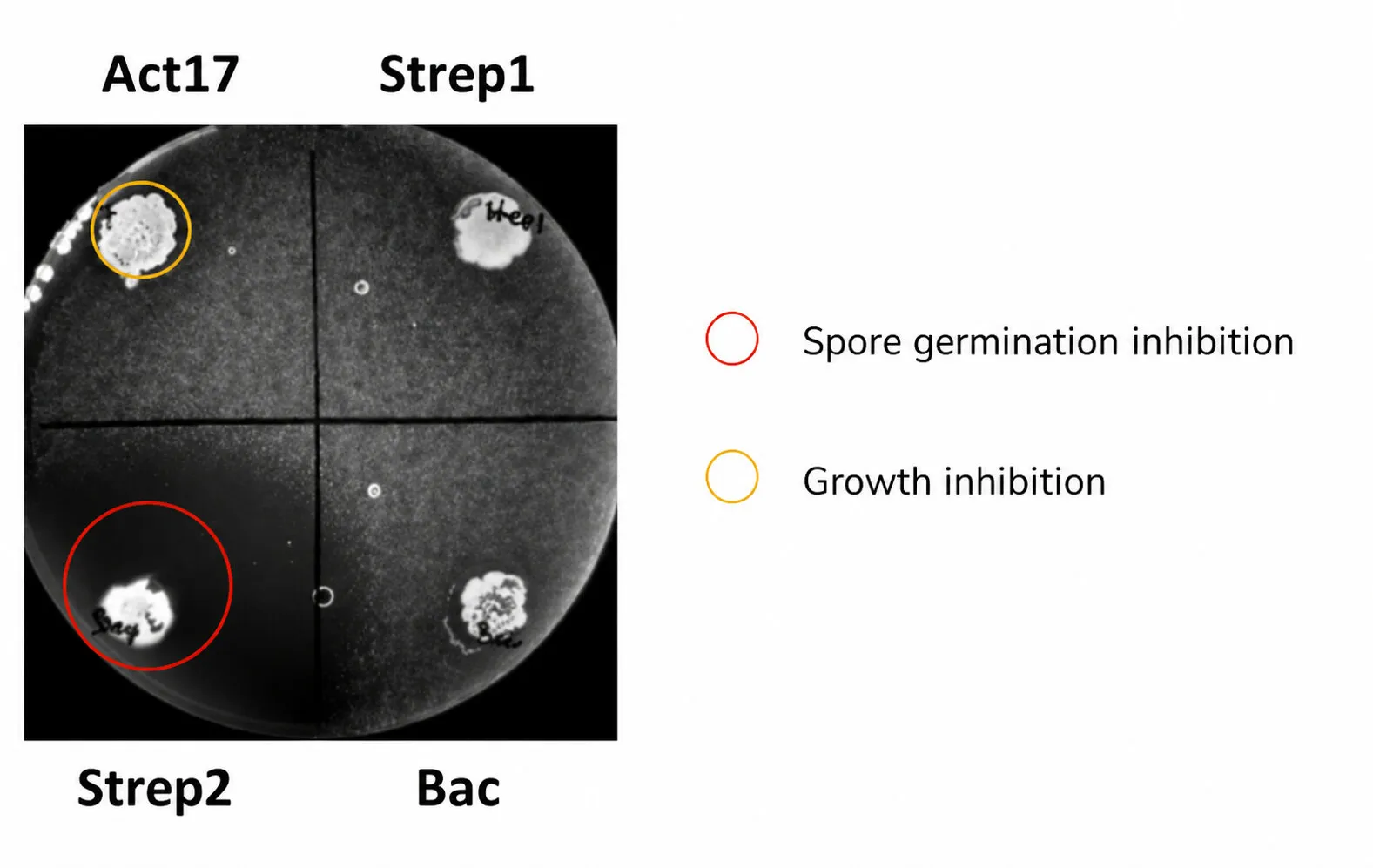
Microbial inhibition screening plate comparing Act17, Strep1, Strep2, and Bac
Microbial inhibition screening plate
Move from a library of isolates to a defensible experimental shortlist.
  1. Research challenge

    A discovery team has promising isolates, but sample metadata, sequencing files, assemblies, and screening notes are split across tools. Comparing the evidence across strains makes it difficult to decide what to test next.

  2. How GenomeMiner helps

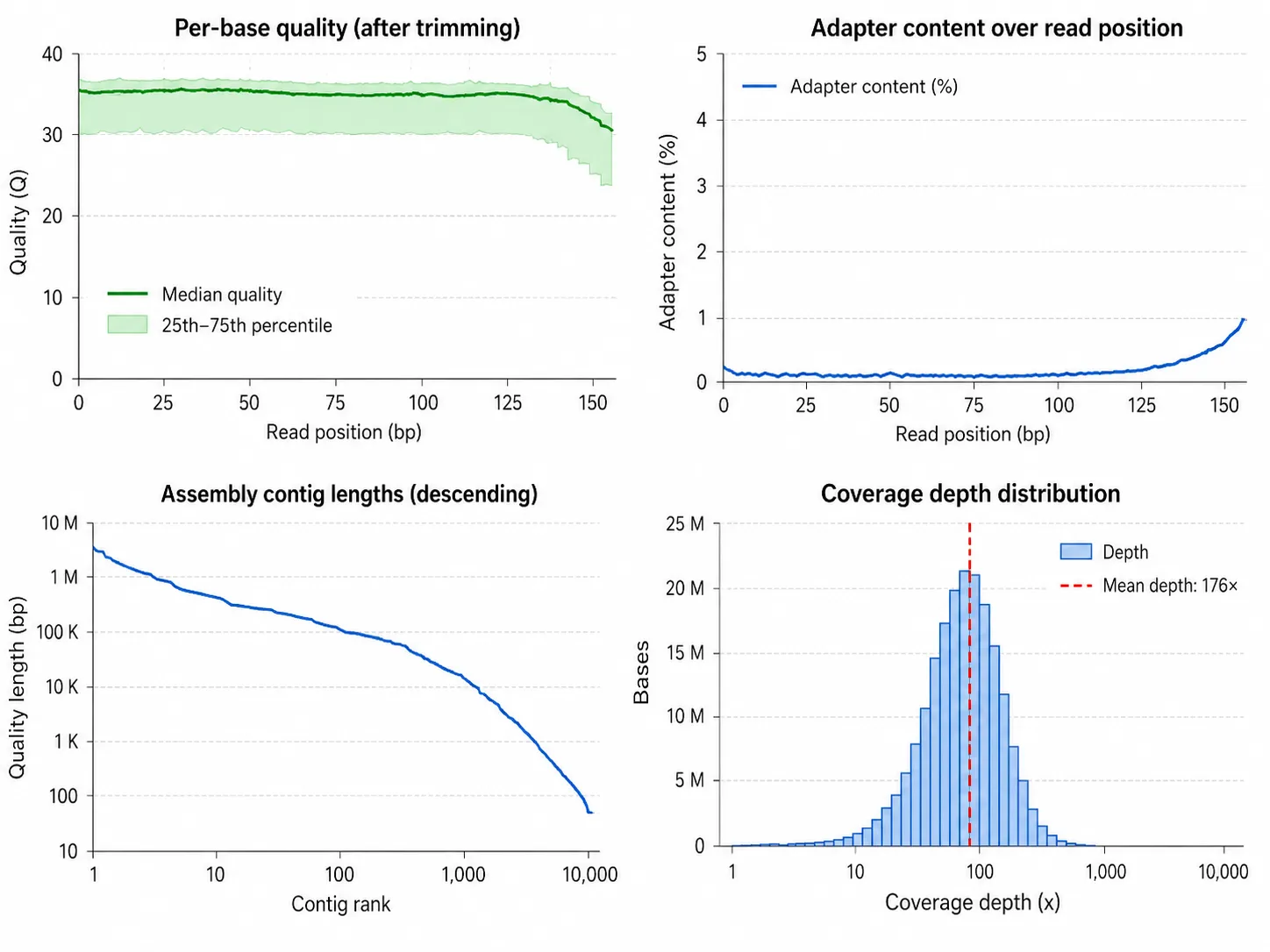
    The team organizes each strain in a shared workspace, processes the reads, evaluates assembled genomes, and runs taxonomic, annotation, and biosynthetic gene cluster pipelines. Structured records connect candidates to their files, runs, and outputs.

  3. Outcome

    Researchers can review a traceable evidence package for each strain and prioritize the most promising candidates for wet-lab validation while retaining the full analysis history for collaborators.

Running a similar program?Try it on your own data

Free project pilot

Run your own data through GenomeMiner, free.

Tell us about your project. We'll set up a workspace, recommend the right pipelines, and provide free credits so you can evaluate GenomeMiner on real research, not a demo dataset.

Request a free pilotPilot access and credits are scoped to your project.
  • Free pilot with pipeline credits
  • No infrastructure to set up
  • Bring your existing pipelines

How the pilot works

  1. 1Tell us about your data and research goal.
  2. 2We identify the right pipelines and allocate credits for your project.
  3. 3Your team runs real analyses in its own GenomeMiner workspace.

Request your free pilot.

Leave your details and we'll contact you to discuss the right setup for your project.

Which best describes your organization?

Access duration and pipeline credits are based on the agreed project scope.

Traffic analytics

Allow Google Analytics to measure visits to this website? You can reject or withdraw at any time. Your choice does not affect site access or enquiries.

Analytics is off.